

NEW STUDENT CHECKLIST
Welcome! We’ve gathered the following resources to help parents and other supporters stay informed throughout the onboarding process.
Students, personal task management happens in the WolfDen. We encourage you to visit the “Next Steps” tab for a customized list of actions.
1. First Steps
Complete the New Student Survey
Help us make your transition to WOU as smooth as possible. This survey lets you double check things like your major and tuition rate so there are no surprises later, and connect you with the resources you’re interested in. It takes less than 5 minutes!
Activate Your WOU Student Portal and Email
The WOU Student Portal is where you will access your student email, view your financial aid package, register for classes, and more.
For step-by-step instructions on setting up your WOU Portal or WOU Email, visit our help page.
2. Register for Classes
Submit Final Official Transcripts
Submitting your final official transcripts prevents registration holds later, so that nothing stands in the way of choosing your classes. It also makes sure any college classes you’ve already taken count towards your degree.
Complete Your Student Financial Agreement
The Student Financial Agreement is a student’s promise to pay their bills, and is required for all students before they register for classes.
Link above not working? You can find the agreement on the Transact card in Experience. After logging in to your WOU Portal, click the Experience icon at the top of the page. From there, navigate to the “My Account” page from the menu bar, and click “ACCESS YOUR TRANSACT ACCOUNT” in the Transact card. You’ll be automatically asked to complete the Student Financial Agreement. Once you agree to the terms and conditions your hold will be automatically lifted.
Complete Your Advising Orientation Module
Complete your advising orientation module to help make sure you’re ready to register for classes and your first term at Western Oregon University!
Download Navigate360
Navigate360 is an app that helps you keep track of your classes and set up appointments with different campus resources (ex. advising, financial aid, tutoring).
You can download it from the Apple App Store or the Google Play Store.
Navigate360 for Apple App Store Navigate360 for Google Play Store
Set up Your Advising Appointment & Register for Classes
All new students must set up an advising appointment to get registered for classes. Be sure to check your WOU Email frequently for updates from your advisor!
For Fall 2026 students, advisors will begin reaching out to your WOU email in May!
- First-Year Students: Class registration begins on May 25.
- Transfer Students: Class registration begins on May 11.
3. Paying for School
Apply for Financial Aid & Scholarships
Submit your Free Application for Federal Student Aid (FAFSA) or Oregon Student Aid Application (ORSAA)! By completing the FAFSA or ORSAA, you’re taking advantage of the best student loan options and becoming eligible for grants, work-study, and scholarships.
Paying for College Information & Help
Apply for additional scholarships through the WOU General Scholarships Application, open between November 1 and March 1.
WOU General Scholarship Application
Admitted first-year students with a 3.0+ GPA. are automatically awarded Merit Awards based on incoming GPA. Incoming transfer students are awarded Merit Awards with a 3.0+ GPA.
Merit Awards
Create Your StudentForms Account
Your StudentForms account helps you check on outstanding award requirements and submit documents for verification, professional judgment, etc.
Finish FA Dashboard To-Dos
Check and resolve any outstanding items on your Financial Aid Dashboard. You can see these under “Home.”
View (and Accept!) Your Financial Aid Offer
View and accept your financial aid offer! You can find it under the “Offer” tab.
Make sure to check you have the correct aid year selected at the top!
Sign Up for Direct Deposit
Direct Deposit (E-Refund) lets you:
- Get your refund directly sent to your bank account!
- Avoid issues with checks (lost, mailing delays, expiration dates)
Make sure to “Sign in with WOU Student, Staff and Faculty ID”
4. Life at WOU
Submit Health History and Immunization Form
Under Oregon state law, we’re required to collect health and immunization information — you won’t be able to register for classes in future terms without it.
How to Submit:
Option 1: Online (Fastest)
- WOU Student Portal > Medicat Patient Portal > Forms
Option 2: Paper Form
- Download and fill out the Health History and Immunization Form (PDF) and submit it to the Student Health and Counseling Center (SHCC):
- In-Person: Drop it off at the SHCC office.
- Mail: 345 Monmouth Ave. N., Monmouth, OR 97361.
- Email: health@wou.edu (Note: Email is not a confidential form of communication).
Questions? Call at (503) 838-8313 or stop by the SHCC.
Complete Bystander Intervention & Hazing Prevention Trainings
All students are required to complete bystander intervention training and hazing prevention training. At WOU, these are administered through a program called “Catharsis,” and the trainings are called “U Got This” and “StandUp to Hazing.” If students do not complete these trainings by week 4 of their first term at WOU, a hold is placed on their account until they’ve completed the training.
Students starting in fall term should have access to the trainings by the end of July. Students starting in other terms should have access to the trainings by week one of the term they start. When the trainings are available, students should receive an “invitation” email in their WOU account from Catharsis that will include training information and links to access the trainings.
[Summer & Fall Students Only] Register for PACK Connect Day (Summer Orientation)
PACK Connect Days are our summer orientation days where you get to learn about resources on campus, connect with fellow new wolves, and get all your questions answered! Registration is now open!
If you won’t be able to make it to a PACK Connect Day, no worries—just fill out this form to let us know and get connected to resources!
Students are highly encouraged to register for the July 8th and July 10th PACK Connect Days. There will be one session on August 21st for students who absolutely cannot make a July day.
[Fall Students Only] Prepare for PACK Welcome Week Orientation
Fall orientation is your time to get to know all about WOU, make new friends, and explore various opportunities available to you as you embark on your journey as a Wolf!
2026 PACK Welcome Week will occur the week prior to fall classes beginning. More information coming soon!
[Winter & Spring Students Only] Register for Winter/Spring Orientation
Our Winter & Spring orientations give you a personalized find-your-classes and resources tour! Get connected to the areas that you need for a mid-year start at WOU!
Optional Tasks
Find and Obtain your Course Textbooks
Many classes require textbooks. You can see what textbooks you need for your courses on the WolfStore Website!
Review Your Housing Assignment & Prepare for Move-In
After applying for housing, learn more about your next steps and helpful tips for preparing for move-in day!
Apply for TRIO Programs
Western has two TRIO Programs—the Student Enrichment Program (SEP) and Teacher Prep Student Support Services (TPSSS) for incoming students that identify as being first generation (neither parent graduated from a 4-year college), meet financial eligibility requirements, or are eligible to receive services through our Disability Access Services. These programs are a great resource that provides additional support year round, free First-Year Seminar classes, and more!
Apply for the On-Track Program
The On-Track program is designed to provide historically underrepresented and underserved college students with a support program that will assist in ensuring academic and personal success, as well as provide opportunities for social development.
Register for Accommodations with Disability Access Services
Disability Access Services (DAS) intentionally provides individually tailored, reasonable accommodations for the Western Oregon University (WOU) community and its programs. Acting under the values of DAS, we aim to cultivate lifelong learning, personal growth, and self-advocacy.
If you would like to request a disability-related accommodation(s) to participate in a WOU activity or event, complete the online request form at least three (3) business days in advance. If you are faculty or staff and have questions, please contact Human Resources at 503-838-8490 or email hr@wou.edu. If you are a student or community member and have questions, please contact Disability Access Services (DAS) at 503-838-8250 or das@wou.edu.
Update Your Preferred Name
Western Oregon University is committed to creating a welcoming and inclusive community. If you’d like to change your preferred name in WOU systems, you can do so online!
Find On-Campus and Local Jobs & Internships
To really know what you need for your future, we encourage you to try it out first! The Center for Professional Pathways (CPP) can help connect you with opportunities to give you necessary skills and experience that you will need for your careers down the road. You can find current and upcoming job listings on Handshake!
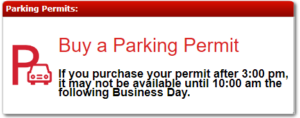
Purchase a Parking Permit
If you plan on parking on campus while you’re here, you need to purchase a year-long parking permit.
Parking permits can be purchased on your WOU Portal page. Click on the “Buy a Parking Permit” module located in the right hand column and follow the on-screen instructions. These will be available to purchase near your first term.