


Free Personal WebEx Account
Step 1
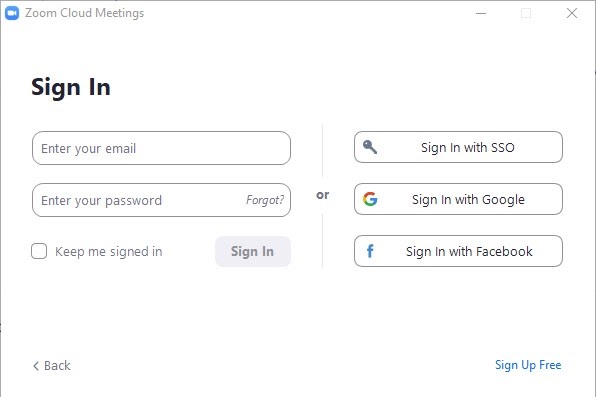
Sign into the Zoom desktop client
Step 2
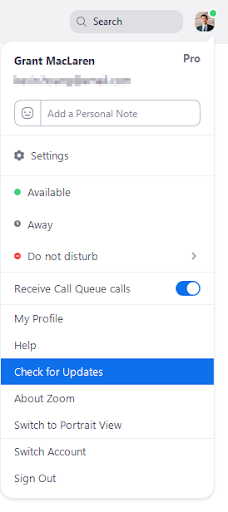
Click your profile picture then click Check for Updates
Updating to Latest Zoom version
From your iOS device: Go to the App store, tap on account, and update Zoom Cloud meetings.
From your Android device: Go to the Google Play store, tap on Zoom Cloud meetings and update.
Additional information – Where do I download the latest version?
New and enhanced features – for Version 5.0
-
- AES 256-bit GCM encryption – Windows, macOS, Linux, iOS, Android
Zoom is upgrading to the AES 256-bit GCM encryption standard, which offers increased protection of your meeting data in transit and resistance against tampering. This provides confidentiality and integrity assurances on your Zoom Meeting, Zoom Video Webinar, and Zoom Phone data. This version of the Zoom client will support GCM encryption when it is automatically enabled for all accounts on May 30. - Meeting features
- Report a user during a meeting – Windows, macOS, Linux, iOS, Android
The meeting host can now report a user during a meeting by clicking on the Security icon, then Report. This feature will generate a report which will be sent to the Zoom Trust and Safety team to evaluate any misuse of the platform and block a user if necessary. - Additional feedback options at the end of a meeting – Windows, macOS
Users will now have the ability to provide additional feedback if the setting Post meeting feedback survey is enabled. This feedback can also be viewed in Dashboard and can be downloaded as a spreadsheet. This setting was previously named Display end of meeting feedback survey. - Enhancements to meeting end/leave flow – Windows, macOS, Linux, iOS, Android
The host will now be required to assign a new host when leaving the meeting. Additionally, the pop-up message asking if the host would like to leave or end the meeting will now be displayed by the Leave button. - Show the connected data center – Windows, macOS, Linux, iOS, Android
Users can see which data center they are connected to by clicking on by clicking on the info icon at the top left of the client window. - Select data center regions when scheduling a meeting – Windows, macOS, Linux, iOS, Android
Users can now select which data center regions they would like their in meeting traffic to use when scheduling a meeting.
- Report a user during a meeting – Windows, macOS, Linux, iOS, Android
- Chat features
- Indication of an external user – Windows, macOS, Linux, iOS, Android
Users will have the label “External” next to their name if they are not part of your Zoom account. This label will be displayed in one on one messages. This label will also be displayed in the user’s profile details when you hover over their profile picture and in the channel members list.
- Indication of an external user – Windows, macOS, Linux, iOS, Android
- Phone features
- Enhanced encryption – Windows, macOS, Linux, iOS, Android
Zoom supports secure voice calls across all supported SIP devices, desktop, and mobile clients. Zoom Phone supports standards-based encryption using SIP over TLS 1.2 Advanced Encryption Standard (AES) 256-bit algorithm for calls and during phone provisioning sessions. In addition, call media is transported and protected by SRTP with AES-256 bit algorithm for Zoom desktop and mobile clients, and with AES-128 bit algorithm for devices.
- Enhanced encryption – Windows, macOS, Linux, iOS, Android
- AES 256-bit GCM encryption – Windows, macOS, Linux, iOS, Android
Additional information on Zoom 5.0 – New updates for April 27, 2020 – Version 5.0